Health Data Screen
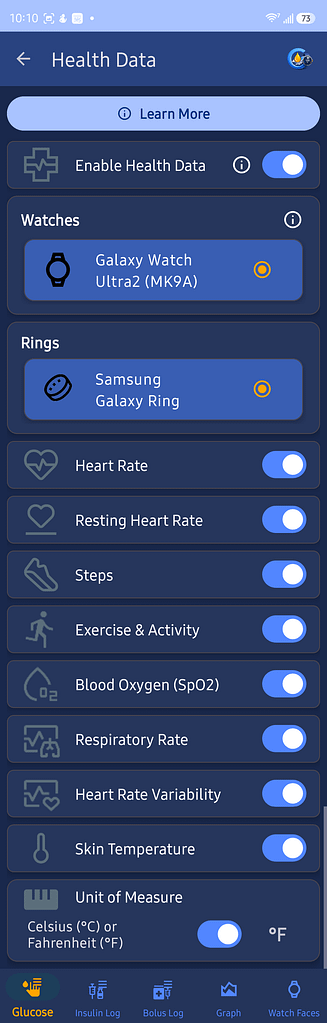
Use Health Data to choose which supported health measurements GlucoGlance collects and displays.
Tap Learn More to read about Predictive Metabolic Variance Modeling.
Enable Health Data
Turn this switch on to allow GlucoGlance to collect supported health data.
Turn it off to disable health data collection.
Select a Device
Choose the watch or ring that GlucoGlance should use as the health data source.
Only supported connected devices are shown.
Health Measurements
Use the switches to enable or disable each measurement:
- Heart Rate
- Resting Heart Rate
- Steps
- Exercise and Activity
- Blood Oxygen
- Respiratory Rate
- Heart Rate Variability
- Skin Temperature
These settings control which measurements GlucoGlance collects and displays.
Temperature Unit
Choose how skin temperature is displayed:
- Celsius
- Fahrenheit