Example Complication Builder Screen
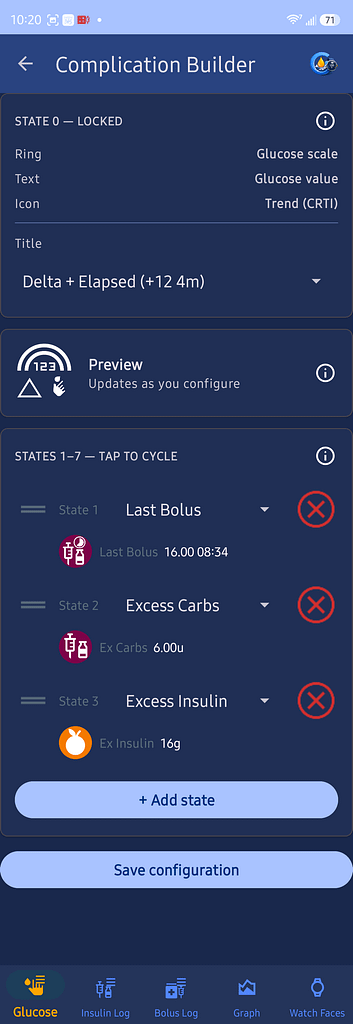
Use the Complication Builder to customize the information shown in supported Wear OS watch-face complications.
A complication is a small area on a watch face that can display glucose, trend, insulin, timing, or other information.
State 0
State 0 is the default complication display.
It is locked and always appears when the complication first loads.
State 0 can display:
- Glucose scale
- Glucose value
- Trend icon
- A selected title, such as Delta and Elapsed Time
Additional States
You can add up to seven additional states.
Tap the complication on the watch to cycle through the configured states.
Each state can display different information in the same complication location.
Examples include:
- Last Bolus
- Excess Carbs
- Excess Insulin
- IOB
- COB
- Battery information
- Elapsed time
Add a State
Tap Add State to create another complication state.
Choose the information to display from the available list.
Change the State Order
Press and hold the drag handle beside a state, then move it up or down.
The order shown determines the order used when cycling through states on the watch.
Remove a State
Tap the red X beside a state to remove it.
State 0 cannot be removed.
Save Configuration
Tap Save Configuration after making changes.
The saved configuration is then used by supported GlucoGlance Wear OS complications.